

Installing CSF and Fail2Ban on a Centos 6 + Directadmin server
Fail2Ban ensures that the IP addresses that try to log in are automatically blocked after 5 or more incorrect login attempts (you can set this limit yourself).
wget https://download.configserver.com/csf.tgz

tar -xzf csf.tgz

cd csf

sh install.sh
Once you have done that, you will see Firewall & Security in DirectAdmin ConfigServer under the heading Extra Features.
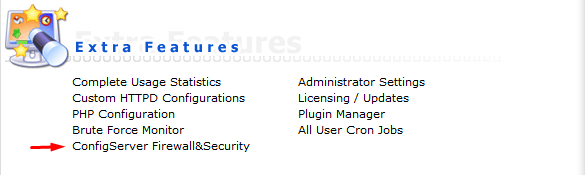
Now CSF is installed on your server and you can configure the security to your own needs. You can also perform a server check in CSF, if you click on Check Server Security , you will see the status of your security and how you can adjust it.
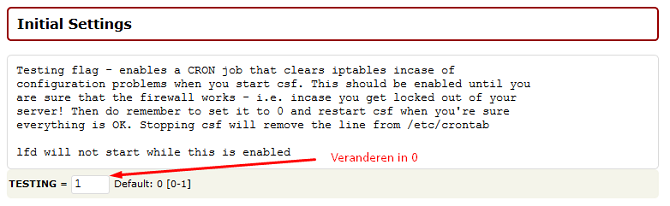
Please note! CSF is not yet active; Don’t forget to change TESTING = 1 to 0 under Firewall Configuration, as soon as you have changed that, CSF will be active. Then restart CSF.
Fail2Ban:
– Download the rpm repository for Fail2Ban:
rpm -Uhv http://mirrors.ircam.fr/pub/fedora/epel/6/i386/epel-release-6-8.noarch.rpm

OF

yum install epel-release
yum install fail2ban Type Y and then click enter. Now Fail2Ban is installed on your server, but not yet configured and launched. You can open the configuration file with an editor of your choice, for example nano:
nano /etc/fail2ban/jail.conf
A number of things are useful to set to your own liking, including the following values. ignoreip – bantime – findtime – maxretry In the jail.conf you can activate fail2ban for various functions such as: SSH, FTP, SMTP etc. In this case, we activate Fail2Ban for SSH. Scroll down until you see ssh-iptables and change enabled to true and your email address, so you will automatically receive an email when an IP is blocked, as a maxretry you can enter after how many login attempts an IP address is blocked.
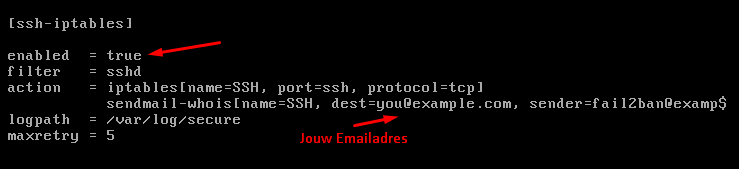
When you’re done, save the file with CTRL+X and then Y for Yes and hit enter. Now that you’re back in the console, start the fail2ban service:
service fail2ban start
Now Fail2Ban is active! Every IP address that logs in incorrectly 5 times will now be automatically included in the firewall.
