


CentOS
You first need to log in as ‘root’ on your SERVER. Then run the following command to configure the network interfaces.
vi /etc/sysconfig/network-scripts/ifcfg-eth1
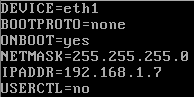
Enter the configuration for eth1 (the private network interface). Choose an internal IP address.
DEVICE=eth1 BOOTPROTO=none ONBOOT=yes NETMASK=255.255.255.0 IPADDR=192.168.1.7 USERCTL=no
Save your settings and run the following command to restart the network.
/etc/init.d/network restart
Block "serverbeheer-aanbod-content" not found