


This document explains how Partners can use Mail Control Panel (MCP) in Mail Suite to manage their customers.
IMPORTANT NOTE:
If you are registering a customer which is not yet associated with Zoho, then you can add directly customer details to “Add Organisation” option under Manage Customer page in above link. Once a customer registers using this link then that customer will be directly added to your account and it is not necessary to map or get token from that customer.
- Please request your customer to generate an authorize token for Mail Suite using the following link: https://store.zoho.com/html/store/transfertoken.html
- Your customer should ensure that “MCP Access” check box is selected, when generating the token.
- Use the Map customer link in Partner store to apply the token and map the customer to your partner store.
- Partner team will receive an approval request when you apply the token.
- Once the partner team approves, you will again MCP access for your customer.
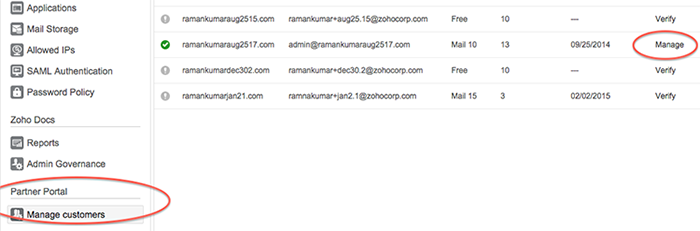
- After that you can manage this customer from Manage Customer page under this link https://mail.zoho.com/cpanel/index.do. A sample page is given below:

- Once you click the Manage click, it will take you to customer’s mail page. From there, you can click Subscription link to buy licenses.
Block "serverbeheer-aanbod-content" not found